Build an enterprise observability solution for Amazon Quick
Ch11.020 Build an enterprise observability solution for Amazon Quick
📊 Level ⭐⭐ | 21.4KB |
entities/build-an-enterprise-observability-solution-for-amazon-quick.md
Build an enterprise observability solution for Amazon Quick
Summary: 使用Amazon Bedrock AgentCore构建企业级可观测性解决方案,监控Amazon Quick服务的最佳实践
核心内容
Build an enterprise observability solution for Amazon Quick
When hundreds to thousands of users are onboarded to an enterprise AI platform, business leaders and platform owners need visibility into who is using the platform, whether users are satisfied with the answers they receive, and which capabilities are driving the most engagement. Without a centralized observability solution, this data is scattered across multiple AWS services and difficult to analyze at scale.
Amazon Quick is a generative AI-powered platform that brings together Spaces, Chat agents, Flows, Automate, Research, and Amazon Quick Sight business intelligence capabilities in one place. As organizations scale their Amazon Quick deployments, they need a reliable way to track adoption, measure satisfaction, monitor costs, and audit governance from a single pane of glass.
In this post, we show you how to deploy a solution that consolidates the Amazon Quick operational data from Amazon CloudWatch vended logs and AWS CloudTrail events into a secured data lake in Amazon Simple Storage Service (Amazon S3) that can be queried using Amazon Athena, a Quick Sight dashboard, and a Quick custom chat agent.
Solution overview
Amazon Quick publishes usage and interaction data through the vended logs to deliver chat conversations, user feedback, agent/research hours usage, and index storage usage in Amazon Quick. Amazon Quick is integrated with AWS CloudTrail, which provides a record of actions taken by a user, a role, or an AWS service in Amazon Quick.
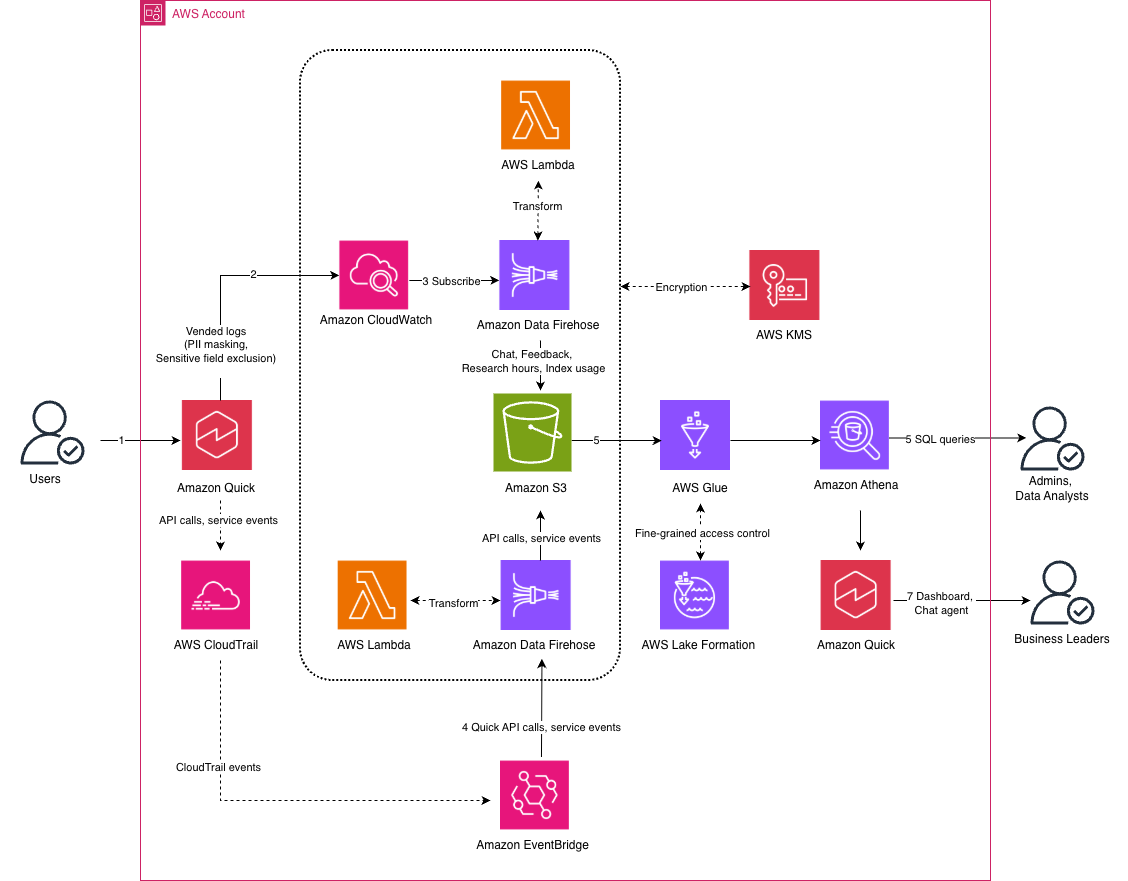
Figure 1: Amazon Quick enterprise observability solution architecture
The workflow consists of the following steps:
- Business users interact with Amazon Quick.
- Amazon Quick publishes the interaction logs to Amazon CloudWatch vended logs. You can protect these logs with data protection policies to mask sensitive data, such as credentials (private keys, AWS secret access keys), financial information, personally identifiable information, protected health information, and device identifiers.
- CloudWatch subscription filters forward the log events to Amazon Data Firehose delivery streams. The Firehose delivery streams transform the data using an AWS Lambda function and write it to a data lake in Amazon S3.
- An Amazon EventBridge rule routes Amazon Quick API calls from AWS CloudTrail and sends them to a dedicated Firehose delivery stream. The Firehose delivery stream transforms the data using an AWS Lambda function and writes it to the data lake.
- AWS Glue Data Catalog maintains data lake metadata for Amazon Athena external tables and analytical views.
- Administrators can use Amazon Athena to query the data. AWS Lake Formation provides fine-grained data lake permissions at the table and column level.
- Business leaders and stakeholders can see the data in a Quick Sight dashboard for interactive exploration of adoption, satisfaction, cost, and governance data. They can also use a Quick custom chat agent with natural language questions to receive instant visual answers.
The solution encrypts the data at rest using a customer managed AWS Key Management System (AWS KMS) key with automatic key rotation. The solution encrypts the Amazon CloudWatch Log Groups, Amazon Data Firehose delivery streams, AWS Lambda function environment variables, and Amazon S3 data lake. This provides a unified encryption strategy across the entire pipeline.
Prerequisites
To deploy this solution, you need:
- An AWS account with Amazon Quick subscription
- Python 3.9+
- Node.js 20+
- AWS Cloud Development Kit (AWS CDK)
- AWS Command Line Interface (AWS CLI) V2
- An AWS CLI profile with IAM permissions to deploy the solution, including creating AWS Identity and Access Management (IAM) roles, AWS KMS key, Amazon CloudWatch Log Groups, an Amazon S3 bucket, AWS Lambda functions, Amazon Data Firehose delivery streams, Amazon EventBridge rules, and AWS CloudFormation stacks. If you choose AWS Lake Formation for data catalog access control, the deploying identity must be a Lake Formation administrator.
Deploy the solution
The deployment is organized into steps, each building on the previous one. You can stop after any step and have a working solution at that level. Settings like the AWS CLI profile, resource prefix, database name, and workgroup name are saved locally after each step, so subsequent steps auto-populate them.
Clone the repository
Clone the GitHub repository and navigate to the project directory:
git clone https://github.com/aws-samples/sample-quick-observability-platform

cd sample-quick-observability-platform
Set up vended logs
Deploy the Amazon CloudWatch Logs infrastructure:
The script auto-detects your Quick subscription region, creates the AWS KMS key, and configures vended logs delivery for chat, feedback, agent hours, and index usage data.
The deployment prompts for CloudWatch log groups to create (/aws/vendedlogs/quick/chat, /aws/vendedlogs/quick/feedback, /aws/vendedlogs/quick/agent-hours, /aws/vendedlogs/quick/index-usage). It also prompts for a prefix (quickobserve) for other AWS resources to be created.
Chat message content (user_message and system_text_message) might contain sensitive or regulated data from connected enterprise sources such as databases, Amazon S3 buckets, or third-party integrations. Before enabling message content logging, review your organization's data privacy, compliance, and data retention policies. The chat message content is omitted by default so that no user conversation data reaches CloudWatch Logs. The deployment prompts you if you want to log the chat message content.
Deploy data pipeline
Use the following command to deploy the pipeline:
This deploys Amazon S3 data lake, Amazon CloudWatch Logs subscription filters, Amazon Data Firehose delivery streams, AWS Lambda functions and an Amazon EventBridge rule.
You can see the logs data in Amazon S3 data lake (quickobserve-pipeline-datalake-
Set up data catalog
Use the following command to run the data catalog setup:
The script prompts for a database name (quickobserve_db) and verifies that it doesn't already exist in the AWS Glue Data Catalog, preventing accidental changes to tables belonging to other workloads. It then prompts you to choose how data lake access is managed:
- Lake Formation (default) – Registers the data lake location and grants fine-grained permissions to the Amazon Quick service role at the table and column level. When message content logging is enabled, column-level exclusion prevents message content from flowing into the Quick Sight dashboard and topic.
- IAM policies – Skips AWS Lake Formation setup and relies on IAM policies for access control. Use this if your account does not use Lake Formation.
The script creates an AWS Glue Data Catalog database, Athena tables and views for CloudWatch vended logs and CloudTrail events.You can see the data catalog in AWS Glue:
Verify data is flowing by running the following queries in Amazon Athena query editor:
SELECT * FROM "quickobserve_db"."agent_hours_logs" ;

SELECT * FROM "quickobserve_db"."chat_logs" ;

SELECT * FROM "quickobserve_db"."cloudtrail_events" ;

SELECT * FROM "quickobserve_db"."feedback_logs" ;

SELECT * FROM "quickobserve_db"."index_usage_logs" ;

SELECT * FROM "quickobserve_db"."cloudtrail_events" ;
Deploy Quick Sight dashboard
Deploy the Quick Sight dashboard:
This deploys Quick Sight resources: a custom theme, a data source, datasets with daily refresh schedules, an analysis, and a dashboard for viewing Amazon Quick observability metrics.
You can see the observability metrics in Quick Sight dashboard:
- Log in to the Amazon Quick console.
- From the left navigation menu, select Dashboards, and then select Quick Observability Dashboard.
Each sheet in the dashboard includes date range parameter controls and a detail table at the bottom. Selecting any chart, pie slice, or KPI filters the detail table to show the matching records.
Create Quick custom chat agent
This step is performed through the Amazon Quick console.
Business leaders can ask questions like "Which Amazon Quick features are being used the most in the last 30 days?" They will receive instant visual answers with metrics, charts, and actionable recommendations.
深度分析
1. 双重数据通道的架构权衡
该解决方案构建了两条平行但互补的数据收集路径:CloudWatch vended logs 处理交互行为数据(chat、feedback、agent-hours、index-usage),CloudTrail 处理 API 调用事件。这种分离设计具有实际意义——CloudTrail 记录的是 AWS API 层面的操作(如用户登录、权限变更),而 CloudWatch 记录的是应用层面的使用模式。
从 Agent Harness Observability Production 的视角看,这种双通道模式符合生产可观测性的"指标-日志-追踪"三元素模型:CloudTrail 提供审计追踪(audit trail),CloudWatch 提供行为日志,Athena 查询提供分析指标。EventBridge 在两条路径间起到路由协调作用,将 CloudTrail 事件通过独立的 Firehose 流写入数据湖,避免与 CloudWatch 日志争抢同一通道的吞吐量。架构上避免了单一流处理管道成为性能瓶颈,同时保留了不同数据类型的独立生命周期管理能力。
2. 数据保护策略与合规边界的精确控制
解决方案中数据保护策略(data protection policies)针对五类敏感数据:凭证、财务信息、PII、PHI、设备标识符。这是 AWS 原生提供的日志级别脱敏能力,属于预防性控制而非检测性控制。
值得注意的设计细节:chat message content(user_message 和 system_text_message)默认不记录。这并非技术限制,而是合规优先的设计决策——企业环境中用户与 AI agent 的对话可能涉及商业机密、内部流程、或者集成自第三方数据源的结构化数据。在 Hermes Observability 所强调的"可观测性不等于全量采集"原则下,这个默认关闭的设置体现了数据最小化原则(data minimization principle),是企业合规架构中的重要考量。
此外,Lake Formation 的列级权限(column-level exclusion)进一步确保即使在日志开启场景下,message content 也不会流入 Quick Sight dashboard 和 topic——这是分层授权控制的体现。
3. KMS 统一加密策略与密钥轮换
方案采用客户管理的 KMS key 覆盖整个管道:CloudWatch Log Groups、Firehose delivery streams、Lambda 环境变量、S3 data lake。这消除了 AWS 服务间的加密策略碎片,降低了"某段数据因默认加密而无法被下游服务访问"的互操作风险。
KMS 自动密钥轮换(automatic key rotation)是企业合规的关键配置——它满足了 PCI-DSS、HIPAA 等标准对密钥有效期(通常不超过 2 年)的要求,同时无需手动干预。在 Hermes Observability Aliyun 的多云可观测性设计中,跨云密钥管理策略也是一个常见挑战,AWS KMS 的自动轮换机制提供了一个可参考的基准实现。
4. Quick Sight + 自定义 Chat Agent 的双层消费模式
解决方案提供了两种数据消费界面:Quick Sight Dashboard 面向可视化探索(交互式图表、筛选器、KPI 仪表盘),自定义 Chat Agent 面向自然语言查询("最近 30 天哪些功能使用最频繁?")。这两者并非替代关系,而是互补的——Dashboard 适合定期审视(scheduled review)和数据发现(data discovery),Chat Agent 适合临时追问(ad-hoc inquiry)和即时决策支持。
从 Agent Harness Observability Production 的"可观测性最终服务于人类决策"角度看,这种双层设计把数据从"被动查询"升级为"主动推送洞察"——Chart Agent 通过自然语言触发可视化答案,实际上是一个以 Retrieval Augmented Generation Rag 模式为基础的问答系统,数据来源是 Athena 查询结果而非静态文档库。
实践启示
1. 在启用 Chat Message Logging 前完成数据隐私审查
解决方案默认关闭 user_message 和 system_text_message 记录。这一默认值应被视为基线而非限制——如果业务确实需要分析对话内容,必须在启用前完成以下评估:数据保留策略(retention policy)、第三方数据来源合规性(是否包含来自 Salesforce、SAP 等集成系统的敏感字段)、以及监管要求(金融、医疗等行业的特定合规义务)。建议在部署脚本中加入合规 checklist,在日志开关处增加人工审批环节。
2. 优先使用 Lake Formation 而非纯 IAM 策略进行访问控制
方案提供了 Lake Formation(默认)和 IAM policies 两个选项。对于企业级部署,Lake Formation 是更优选择,原因有三:列级权限(column-level security)可以做到更精细的数据保护;服务级别权限(service role permissions)与数据湖位置注册联动,减少权限配置错误风险;与 Quick Sight 的集成更紧密,支持 topic 级别的数据隔离。在 Hermes Observability 的零信任原则下,最小权限应精确到列级别,而非仅停留在表级别。
3. 将数据湖扩展纳入长期可观测性规划
方案的扩展方向包括:添加自定义 Athena views 以满足组织特定指标需求、创建额外的 dashboard sheets 支持不同业务线、构建面向不同团队的专用 Chat Agents。企业在实施时应从第一天就规划数据模型的扩展性——特别是 agent-hours 和 index-usage 这类使用量数据,随着用户规模增长,分析维度会快速增加。建议在 AWS Glue 中为每类日志预留扩展字段(如 user_id、department_id、cost_center),避免后期 schema 迁移。
4. 建立 Dashboard 和 Chat Agent 的协同使用文化
Quick Sight Dashboard 和自定义 Chat Agent 分别服务于不同使用场景,企业需要建立对应的使用规范:Dashboard 作为平台团队和领导层的周期性复盘工具(周/月报),Chat Agent 作为业务负责人的即时决策工具(异常告警触发后的根因分析)。建议在 Dashboard 中为每个 KPI 设置阈值告警,在 Chat Agent 的 prompt 中预设"如果指标异常,该问哪些追问"的问题模板,推动数据驱动的组织文化落地。
5. 将 cleanup.py 纳入基础设施即代码(IaC)流程
方案提供了完整的资源清理脚本 python3 cleanup.py。在 CDK 部署模式下,所有资源都应通过 CloudFormation stack 管理,cleanup 脚本实际上是 stack 删除的包装。企业应将清理流程纳入 CI/CD pipeline,确保非生产环境的资源可以及时释放,避免 S3 和 CloudWatch 产生不必要的存储费用。同时,在 production 环境中,cleanup 脚本的使用应经过变更审批流程,避免意外删除可观测性数据影响业务连续性。
关键要点
- 来源: AWS Machine Learning Blog
- 技术栈: Amazon Bedrock, Amazon Quick
- 应用场景: 企业可观测性、业务支持自动化、云端支持
相关实体
- Build Ai Agents For Business Intelligence With Amazon Bedrock Agentcore
- Mcp Serveramazon Bedrock Agentcorequick Suite
- Building Ai Agents For Business Support Using Amazon Bedrock
- From Siloed Data To Unified Insights Cross Account Athena Access For Amazon Quic
- Integrating Aws Api Mcp Server With Amazon Quick Suite Using Amazon Bedrock Agen
- MOC
→ 原文存档