Back up and restore your Amazon EKS cluster resources using Velero | Amazon Web Services
Ch11.011 Back up and restore your Amazon EKS cluster resources using Velero | Amazon Web Services
📊 Level ⭐⭐ | 28.9KB |
entities/back-up-and-restore-your-amazon-eks-cluster-resources-using-.md
When you accidentally delete a production namespace or a cluster upgrade fails, rebuilding your Amazon Elastic Kubernetes Service (Amazon EKS) cluster resources means recreating every deployment, service, and persistent volume manually. With Velero, a backup and restore tool for Kubernetes, you capture resource definitions to Amazon Simple Storage Service (Amazon S3) and persistent volume data as Amazon Elastic Block Store (Amazon EBS) snapshots. Velero supports cross-cluster restores, namespace-level granularity, and portability across Kubernetes distributions. If you need centralized, fully managed backup scheduling instead, AWS Backup for Amazon EKS handles that for you. In this post, you'll learn to back up and restore Amazon EKS cluster resources and persistent volume data using Velero. You'll deploy a sample stateful application, back it up, and restore it to a different namespace within the same cluster. Along the way, you'll configure least-privilege AWS Identity and Access Management (AWS IAM) roles using Amazon EKS Pod Identity and scope Velero's Kubernetes permissions with a custom ClusterRole. A ClusterRole is a Kubernetes resource that defines cluster-wide permissions.
Prerequisites
You'll spend 45 to 60 minutes on this tutorial and incur costs for Amazon S3 storage (based on data stored), Amazon EBS snapshots (based on snapshot storage), and Amazon EKS cluster usage (based on cluster runtime). For detailed pricing information, see Amazon S3 Pricing, Amazon EBS Pricing, and Amazon EKS Pricing. Clean up instructions at the end help you remove all billable resources. To complete this tutorial, make sure you have the following:
- An active AWS account with permissions to create Amazon S3 buckets, IAM policies and roles, and Amazon EKS resources
- An Amazon EKS cluster running Kubernetes 1.35 or later with Amazon EKS Auto Mode enabled. Auto Mode automates networking, node provisioning and scaling. You can use eksctl to create this cluster – Refer steps here
- AWS CLI v2, Helm v3.x, and kubectl installed and configured
- Experience with Kubernetes concepts such as pods, deployments, and persistent volumes, and with IAM roles The default Velero installation uses cluster-admin, which grants broad access to cluster resources. This tutorial replaces it with a least-privilege ClusterRole. Follow those steps for non-demo environments.
Velero overview
Velero is an open-source tool that backs up and restores Kubernetes cluster resources and persistent volumes. Unlike traditional backup solutions that require direct access to storage systems, Velero works through the Kubernetes API to discover and back up resources. This API-driven approach provides several advantages:
- Kubernetes-native: Velero understands Kubernetes resources and their relationships
- Flexible filtering: You can scope backups by namespace, resource type, or label
- Cloud-agnostic: The same backup can be restored to different Kubernetes distributions
-
Snapshot integration: Velero integrates with cloud provider snapshot APIs for persistent volume backups An application-level backup in Amazon EKS targets two components:
-
Kubernetes objects and configurations stored in the EKS control plane
- Application data stored in persistent volumes Refer to the Velero documentation for details on resource filtering. Backup and Restore Workflow
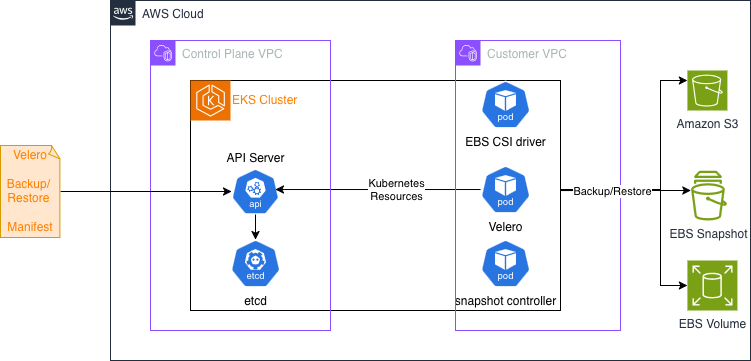 Velero uses a controller deployed as a Kubernetes Deployment to perform backup and restore tasks. A user submits a Backup manifest or Restore manifest (Custom Resource) to EKS, for the Velero controller to perform Backup or Restore. Velero documentation provides details on how they work here.
Tutorial
This tutorial uses Amazon EKS Auto Mode to simplify cluster management. Velero does not require Auto Mode and works on any Amazon EKS cluster. The walkthrough backs up an application in namespace myprimary and restores it to another namespace myrestore in the same cluster.
Set up environment variables
Substitute your cluster name and Region in the following exports. The tutorial references these variables in every subsequent step.
export CLUSTER_NAME=<<Cluster Name>>
export AWS_REGION=<<AWS region>>
export AWS_ACCOUNT_ID=$(aws sts get-caller-identity --query Account --output text --no-cli-pager)
export BUCKET_NAME=velero-backups-$(date +%s)
export POLICY_NAME=VeleroBackupPolicy
export ROLE_NAME=VeleroBackupRole
export AWS_PAGER=""
Configure Amazon S3 and IAM
First, provision the Amazon S3 bucket where Velero stores backup data. aws s3 mb s3://${BUCKET_NAME} --region ${AWS_REGION} Code Next, define an IAM policy granting Velero read/write access to the bucket and Amazon EBS snapshot permissions.
cat > velero-s3-policy.json <<EOF
{
  "Version": "2012-10-17",
  "Statement": [
    {
      "Effect": "Allow",
      "Action": ["s3:GetObject","s3:PutObject","s3:DeleteObject","s3:ListBucket","s3:GetBucketLocation","s3:GetBucketVersioning","s3:AbortMultipartUpload", "s3:ListMultipartUploadParts"],
      "Resource": ["arn:aws:s3:::${BUCKET_NAME}","arn:aws:s3:::${BUCKET_NAME}/*"]
    },
    {
      "Effect": "Allow",
      "Action": ["ec2:CreateSnapshot","ec2:DeleteSnapshot","ec2:DescribeSnapshots","ec2:DescribeVolumes","ec2:DescribeVolumeAttribute","ec2:DescribeVolumesModifications","ec2:DescribeVolumeStatus","ec2:CreateTags","ec2:DescribeTags"],
      "Resource": "*"
    }
  ]
}
EOF
aws iam create-policy --policy-name ${POLICY_NAME} --policy-document file://velero-s3-policy.json
export POLICY_ARN=$(aws iam list-policies --query "Policies[?PolicyName=='${POLICY_NAME}'].Arn" --output text --no-cli-pager)
cat > velero-trust-policy.json <<EOF
{
  "Version": "2012-10-17",
  "Statement": [{
    "Effect": "Allow",
    "Principal": {"Service": "pods.eks.amazonaws.com"},
    "Action": ["sts:AssumeRole","sts:TagSession"],
    "Condition": {"StringEquals": {"aws:RequestTag/kubernetes-namespace": "velero","aws:RequestTag/kubernetes-service-account": "velero"}}
  }]
}
EOF
aws iam create-role --role-name ${ROLE_NAME} --assume-role-policy-document file://velero-trust-policy.json
aws iam attach-role-policy --role-name ${ROLE_NAME} --policy-arn ${POLICY_ARN}
export ROLE_ARN=$(aws iam get-role --role-name ${ROLE_NAME} --query Role.Arn --output text)
aws eks create-pod-identity-association --cluster-name ${CLUSTER_NAME} --namespace velero --service-account velero --role-arn ${ROLE_ARN} --region ${AWS_REGION}
Install Velero
Velero uses Amazon EBS snapshots to take backup of Volumes. This requires the snapshot controller add-on to be installed on you EKS cluster. Connect to your cluster and install it first.
aws eks update-kubeconfig --name ${CLUSTER_NAME}
aws eks create-addon --cluster-name ${CLUSTER_NAME} --addon-name snapshot-controller --region ${AWS_REGION}
cat > velero-values.yaml <<EOF
configuration:
  backupStorageLocation:

  - name: default
    provider: aws
    bucket: ${BUCKET_NAME}
    config:
      region: ${AWS_REGION}
  volumeSnapshotLocation:

  - name: default
    provider: aws
    config:
      region: ${AWS_REGION}
  features: EnableCSI
credentials:
  useSecret: false
serviceAccount:
  server:
    create: true
    name: velero
initContainers:

- name: velero-plugin-for-aws
  image: velero/velero-plugin-for-aws:v1.10.0
  volumeMounts:

  - mountPath: /target
    name: plugins
upgradeCRDs: false
cleanUpCRDs: false
EOF
helm repo add vmware-tanzu https://vmware-tanzu.github.io/helm-charts
helm repo update
helm install velero vmware-tanzu/velero --version 11.4.0 --namespace velero --create-namespace --values velero-values.yaml
kubectl get pods -n velero
cat > velero-cluster-role.yaml <<EOF
apiVersion: rbac.authorization.k8s.io/v1
kind: ClusterRole
metadata:
  name: velero-restricted
rules:

- apiGroups: [""]
  resources: [namespaces,persistentvolumes,persistentvolumeclaims,pods,services,configmaps,secrets]
  verbs: ["get","list","watch","create","update","patch","delete"]

- apiGroups: ["apps"]
  resources: [deployments,replicasets]
  verbs: ["get","list","watch","create","update","patch","delete"]

- apiGroups: ["rbac.authorization.k8s.io"]
  resources: [clusterrolebindings]
  verbs: ["get","list"]

- apiGroups: ["storage.k8s.io"]
  resources: [storageclasses]
  verbs: ["get","list","watch"]

- apiGroups: ["snapshot.storage.k8s.io"]
  resources: [volumesnapshots,volumesnapshotcontents,volumesnapshotclasses]
  verbs: ["get","list","watch","create","update","patch","delete"]

- apiGroups: ["velero.io"]
  resources: [backups,backups/status,restores,restores/status,schedules,schedules/status,backupstoragelocations,backupstoragelocations/status,volumesnapshotlocations,volumesnapshotlocations/status,podvolumebackups,podvolumebackups/status,podvolumerestores,podvolumerestores/status,backuprepositories,backuprepositories/status]
  verbs: ["get","list","watch","create","update","patch","delete"]
EOF
kubectl apply -f velero-cluster-role.yaml
kubectl delete clusterrolebinding velero-server
kubectl create clusterrolebinding velero-restricted-binding --clusterrole=velero-restricted --serviceaccount=velero:velero
cat > snapshot-class.yaml <<EOF
apiVersion: snapshot.storage.k8s.io/v1
kind: VolumeSnapshotClass
metadata:
  name: ebs-csi-snapclass
  labels:
    velero.io/csi-volumesnapshot-class: "true"
  annotations:
    snapshot.storage.kubernetes.io/is-default-class: "true"
driver: ebs.csi.eks.amazonaws.com
deletionPolicy: Delete
EOF
kubectl apply -f snapshot-class.yaml
kubectl rollout restart deployment/velero -n velero
kubectl get backupstoragelocation -n velero

# Expected: PHASE=Available
Back up an application
Deploy a sample application that mounts a PersistentVolumeClaim (PVC). A PVC is a Kubernetes request for storage that provisions an Amazon EBS volume. The application writes timestamped messages to a file that you use to verify the restore. The following manifest deploys the application in the myprimary namespace. It creates the namespace, a StorageClass for encrypted gp3 Amazon EBS volumes, a PVC, and a Deployment that writes to the persistent volume.
cat > deployment-demo-app.yaml <<EOF
---
apiVersion: v1
kind: Namespace
metadata:
  name: myprimary
---
apiVersion: storage.k8s.io/v1
kind: StorageClass
metadata:
  name: auto-ebs-sc
provisioner: ebs.csi.eks.amazonaws.com
volumeBindingMode: WaitForFirstConsumer
parameters:
  type: gp3
  encrypted: "true"
---
apiVersion: v1
kind: PersistentVolumeClaim
metadata:
  name: auto-ebs-claim
  namespace: myprimary
spec:
  accessModes: [ReadWriteOnce]
  storageClassName: auto-ebs-sc
  resources:
    requests:
      storage: 8Gi
---
apiVersion: apps/v1
kind: Deployment
metadata:
  name: demo-stateful-app
  namespace: myprimary
spec:
  replicas: 1
  selector:
    matchLabels:
      app: demo-stateful-app
  template:
    metadata:
      labels:
        app: demo-stateful-app
    spec:
      terminationGracePeriodSeconds: 0
      nodeSelector:
        eks.amazonaws.com/compute-type: auto
      containers:

      - name: bash
        image: public.ecr.aws/docker/library/bash:4.4
        command: ["/usr/local/bin/bash"]
        args: ["-c", "while true; do echo \"Message from \$POD_NAMESPACE - \$(date -u)\" >> /data/out.txt; sleep 15; done"]
        env:

        - name: POD_NAMESPACE
          valueFrom:
            fieldRef:
              fieldPath: metadata.namespace
        resources:
          requests:
            cpu: "100m"
        volumeMounts:

        - name: persistent-storage
          mountPath: /data
      volumes:

      - name: persistent-storage
        persistentVolumeClaim:
          claimName: auto-ebs-claim
EOF
kubectl apply -f deployment-demo-app.yaml
kubectl get po -n myprimary
kubectl exec -n myprimary "$(kubectl get pods -n myprimary -l app=demo-stateful-app -o=jsonpath='{.items[0].metadata.name}')" -- cat /data/out.txt
cat > myprimary-backup.yaml <<EOF
apiVersion: velero.io/v1
kind: Backup
metadata:
  name: backup-myprimary
  namespace: velero
spec:
  includedNamespaces: [myprimary]
  includedResources: [deployments,pods,persistentvolumeclaims,persistentvolumes,services,configmaps,secrets]
  snapshotVolumes: true
  defaultVolumesToFsBackup: false
  ttl: 720h0m0s
EOF
kubectl apply -f myprimary-backup.yaml
Restore an application
Restore the backup to a new namespace called myrestore. Velero's namespace mapping redirects resources from myprimary to myrestore. Apply the Restore custom resource. This YAML specifies which backup to restore and how to map namespaces.
cat > myprimary-restore.yaml <<EOF
apiVersion: velero.io/v1
kind: Restore
metadata:
  name: myprimary-restore
  namespace: velero
spec:
  backupName: backup-myprimary
  namespaceMapping:
    myprimary: myrestore
  preserveNodePorts: true
  restorePVs: true
EOF
kubectl apply -f myprimary-restore.yaml
kubectl exec -n myrestore "$(kubectl get pods -n myrestore -l app=demo-stateful-app -o=jsonpath='{.items[0].metadata.name}')" -- cat /data/out.txt CSS The output shows messages from myprimary, confirming that Velero restored the persistent volume data from the Amazon EBS snapshot. Clean up
Remove the resources you provisioned to stop incurring charges for Amazon S3 storage, Amazon EBS snapshots, and Amazon EKS compute.
kubectl delete -f deployment-demo-app.yaml
kubectl delete namespace myrestore
helm uninstall velero -n velero
kubectl delete namespace velero
kubectl delete clusterrolebinding velero-restricted-binding
kubectl delete clusterrole velero-restricted
aws eks delete-addon --cluster-name ${CLUSTER_NAME} --addon-name snapshot-controller --region ${AWS_REGION}
aws s3 rb s3://$BUCKET_NAME --force
aws iam detach-role-policy --role-name VeleroBackupRole --policy-arn ${POLICY_ARN}
aws iam delete-role --role-name VeleroBackupRole
aws iam delete-policy --policy-arn ${POLICY_ARN}
Conclusion
You configured Velero on Amazon EKS to back up and restore Kubernetes cluster resources and persistent volume data with least-privilege AWS IAM roles and a scoped ClusterRole. To build on what you've learned, try these next steps:
- Automate daily backups of your production namespaces with a Velero Schedule resource.
- Test a cross-cluster restore to a second Amazon EKS cluster in a different Region using the Velero disaster recovery documentation.
- Evaluate AWS Backup for Amazon EKS and compare centralized scheduling against namespace-level granularity and cross-cluster portability.
-
Harden your cluster security by reviewing the Amazon EKS security best practices guide. Share your experiences in the AWS containers community forum. For reference, see the following resources:
- Amazon EKS User Guide
- Amazon EKS Pod Identity
- Amazon EBS CSI driver
- IAM best practices for Amazon EKS
- Amazon S3 bucket policies
- AWS Backup Developer Guide
About the authors
深度分析
- Kubernetes API 驱动的备份架构:Velero 通过 Kubernetes API 发现和备份资源,而非直接访问存储系统。这种 API-first 架构使备份具有 Kubernetes 原生理解能力,支持灵活的过滤器(按命名空间、资源类型或标签),并实现跨 Kubernetes 发行版的可移植性
- EKS Pod Identity 替代传统 Secret 管理:教程展示了使用 EKS Pod Identity 让 Velero Pod 承担 IAM 角色,而非通过 Kubernetes Secret 管理凭证。这通过条件标签
kubernetes-namespace和kubernetes-service-account实现细粒度信任策略,是 AWS EKS 安全最佳实践的体现 - 最小权限 ClusterRole 设计:默认 Velero 安装绑定 cluster-admin 权限,教程专门创建了
velero-restrictedClusterRole,仅授予 Velero 所需的最小 API 权限集。这种权限收窄实践对生产环境安全至关重要 — Velero 只需要操作特定 CRD(backups、restores、schedules 等)和核心资源(pods、persistentvolumes 等) - CSI 快照与 EBS gp3 加密存储集成:教程配置了 VolumeSnapshotClass 使用
ebs.csi.eks.amazonaws.com驱动,并通过 StorageClass 启用 gp3 加密。这确保了持久卷数据在快照层面被完整保护,同时利用了 Amazon EBS 的持久性和加密特性 - 命名空间映射实现跨命名空间恢复:Velero 的
namespaceMapping功能允许将备份从myprimary命名空间恢复到myrestore命名空间,而无需修改原始资源定义。这是灾难恢复场景中的关键能力,支持在同一集群内或跨集群的命名空间隔离恢复
实践启示
- 生产环境应使用 Velero Schedule 而非手动 Backup:教程展示了手动触发 Backup CRD,但生产环境应通过 Schedule 资源自动执行定期备份(每日/每周),并根据业务需求设置合适的
ttl(默认 720h = 30 天) - 备份策略应区分有状态和无状态工作负载:对于有状态应用(如数据库),需同时备份 Kubernetes 对象定义和持久卷数据(
snapshotVolumes: true);对于无状态应用,可以仅备份资源定义以节省 EBS 快照成本 - EKS Auto Mode 不影响 Velero 兼容性:教程使用 EKS Auto Mode 简化集群管理,但 Velero 本身不需要 Auto Mode,可在任何标准 EKS 集群上运行。这为不同集群配置提供了灵活性
- 清理步骤不可省略以避免持续计费:教程最后提供了完整的清理命令,包括删除 Helm release、命名空间、ClusterRole、IAM 角色和 S3 存储桶。EBS 快照需手动检查并删除,否则会产生持续存储费用
- 评估 AWS Backup for Amazon EKS 作为替代方案:对于需要集中化管理备份策略的企业,AWS Backup 提供了全托管的集中备份调度。对于追求跨集群可移植性和灵活命名空间粒度的用户,Velero 仍是更合适的选择
关联阅读
相关实体
- Back Up And Restore Your Amazon Eks Cluster Resources Using Velero Amazon Web Se
- Eks Gpu Operator Custom Driver Cuda Workload
- Restrict Access To Sensitive Documents In Your Amazon Quick Knowledge Bases For 2
- Introducing Claude Platform On Aws
- Build Multi Tenant Ai Agent On Eks Graviton Openclaw K8S Practice
→ 原文存档 - 规划 amazon eks 从 1.32 升级到 1.35:关键变更识别与逐版本实施路径