Introducing Vercel Connect
Ch04.307 Introducing Vercel Connect
📊 Level ⭐⭐ | 8.1KB |
entities/introducing-vercel-connect.md
Introducing Vercel Connect
Overview
Published Time: 2026-06-17T09:17:12.380Z
Markdown Content: Giving your agents access to your tools, data, and services is what makes them useful. As agents perform deeper work across systems, authenticating and authorizing that access becomes central to your application architecture.
Today, agent access is usually granted through long-lived provider tokens stored in your environment variables, provisioned for everything your agent might need. These tokens are shared across every user, never expire, and give your agent full reach across every task, no matter how small the job.
A vault makes that token harder to steal. It doesn't make it less dangerous. The problem is what happens when the token leaks: everything it can touch is now exposed.
We built Vercel Connect to solve this problem. Now in Public Beta, Vercel Connect replaces the stored token with runtime credential exchange. You register a connector once. When your agent has work to do, your app proves its identity to Vercel Connect and gets back a short-lived credential, scoped to the task. Everything you used the token for still works. The agent just requests access each time instead of holding it.

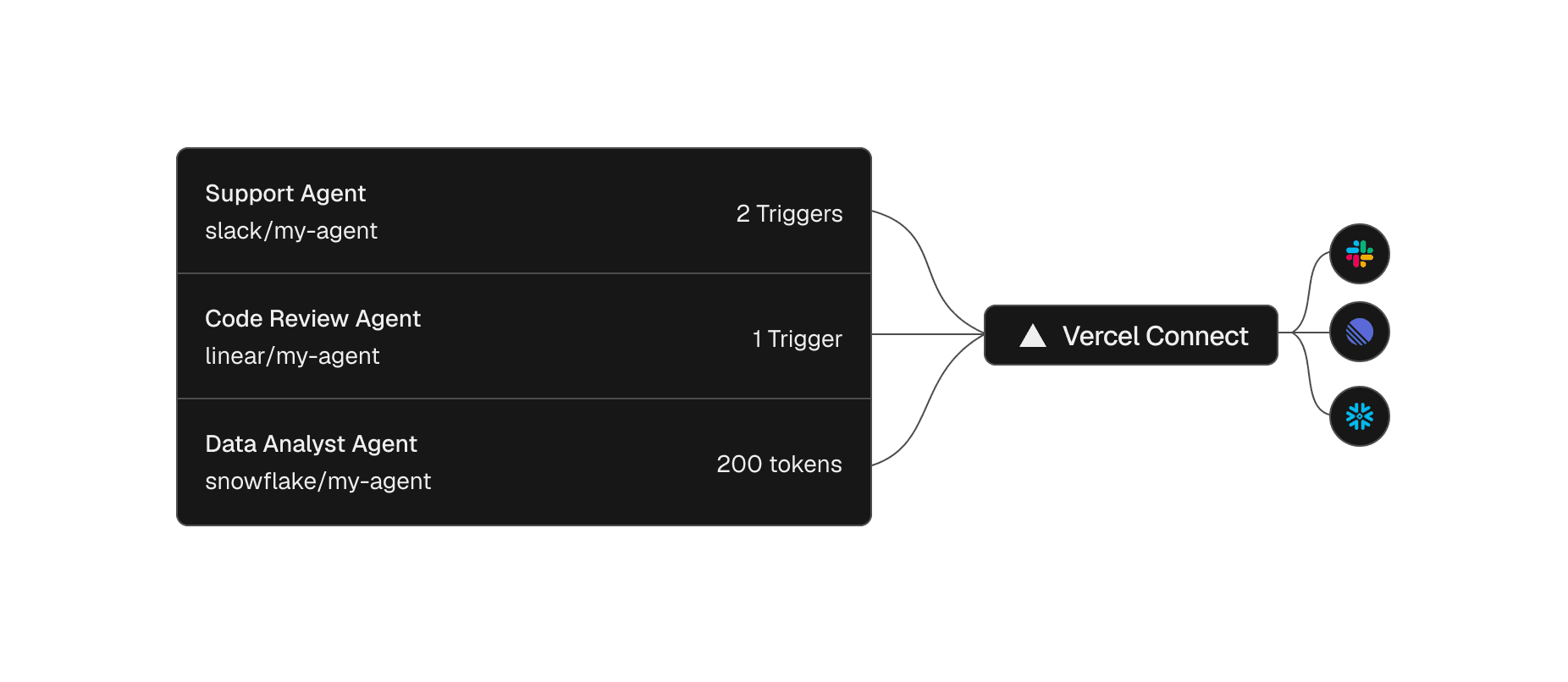
Each agent reaches its service through Vercel Connect, with its own scoped tokens and triggers.
Link to headingRegister a connector once, then reuse it across projects and environments
A connector is a reusable connection between your Vercel team and a provider like Slack or GitHub. You create it once from the dashboard or the CLI, then attach it to the projects and environments that need it, with project-level access controls.
vercel connect create slack --name mybot
Create a Slack connector
The relationship with the provider becomes a single entity you can see and manage, not something scattered across a dozen environment variable panels where a rotation means hunting down every copy.
Your coding agent can run this setup too. Install the vercel-connect skill with npx skills add vercel/vercel-plugin --skill vercel-connect, and it can create and attach connectors for you.
Link to headingRequest scoped tokens at runtime
With a connector in place, the agent asks for a credential only when it has work to do. The @vercel/connect SDK returns a token you use immediately against the provider API, and no provider secret lives in your app.
app/lib/connect-token.ts
import { getToken } from '@vercel/connect';const token = await getToken('slack/mybot', { subject: { type: 'app' },});
Request a token at runtime
Tokens are short-lived, with a lifetime that depends on the provider. The SDK refreshes them automatically, so you never rotate a secret by hand. That leaves one question. If your app holds no secret, what proves it's allowed to ask?
Link to heading**Th
深度分析
从"存储令牌"到"运行时凭证交换"的安全范式转换:Vercel Connect 的核心创新不是更好的密钥管理(vault),而是彻底消除了存储令牌的需求。传统架构中,agent 持有长期有效的 provider token——即使存储在 vault 中,一旦泄露,攻击者获得的是全权限访问。Connect 将认证从"持有秘密"转变为"证明身份":agent 不持有任何秘密,每次需要访问时通过 OIDC 证明身份,获得短期、任务范围限定的凭证。
Connector 作为"连接实体"的抽象价值:将 agent 与外部服务的连接关系抽象为可复用的 connector(一次创建、多项目复用、项目级访问控制),解决了当前 agent 开发中"每个 agent 独立配置 token"的 N×M 复杂度问题。当你的 agent 需要访问 Slack + GitHub + Snowflake 时,不需要 3 套 token 管理——3 个 connector 即可。
OIDC 身份证明是零信任架构的关键拼图:Connect 使用 OIDC(OpenID Connect)让 app 证明自己的身份——这意味着 app 不需要持有任何秘密来证明"我是谁"。这是零信任架构在 agent 认证场景的具体实现,与 SPIFFE/SPIRE 在微服务中的身份证明模式一致。
与 Vercel Agent 生态的协同:Connect 不是独立产品——它是 Vercel agent 生态(eve 框架 + AI Gateway + Connect)的安全层。eve 的 agent 通过 Connect 获取外部服务凭证,通过 AI Gateway 路由 LLM 调用,形成完整的"agent 安全运行时"。这种分层设计比单一的"agent 平台"更灵活。
实践启示
-
立即审计你的 agent token 存储方式:如果你的 agent 持有长期有效的 provider token(即使在 .env 或 vault 中),评估迁移到 Connect 模式的可行性。关键指标:token 泄露后的影响范围(全权限 vs 任务限定)。
-
用 connector 替代环境变量中的 token 管理:为每个外部服务创建一个 Connect connector,替代散布在各处的环境变量。这简化了 token 轮换(一处管理 vs 多处更新)并提供了统一的访问审计入口。
-
为每个 agent 任务定义最小权限范围:Connect 的 scoped token 支持按任务限定权限。在设计 agent 工作流时,为每个任务类型定义最小权限集(如"读取 Slack 消息"vs"发送 Slack 消息"),而不是授予全权限。
-
关注 Connect 的 provider 覆盖范围:Connect 的价值取决于支持的 provider 数量。目前确认支持 Slack 和 GitHub,评估你的 agent 依赖的其他 provider(Linear、Notion、Snowflake 等)是否在路线图中。
-
将 Connect 与 eve 框架结合使用:如果你在 Vercel 生态内构建 agent,Connect + eve 是最佳组合——eve 处理 agent 编排,Connect 处理外部服务认证,AI Gateway 处理 LLM 路由。这种分层架构比单一平台方案更可维护。
→ 原文存档