Getting more from each token: How Copilot improves context handling and model routing
📊 Level ⭐⭐⭐ | 12.5KB
来源: Getting more from each token: How Copilot improves context handling and model routing
How GitHub Copilot is making more of each session go toward useful work, so your credits go further.
June 17, 2026 | Updated June 18, 2026
|
8 minutes
- Share:
As Copilot takes on more agentic work, from planning and editing to debugging, reviewing, and calling tools across longer sessions, efficiency means more than using fewer tokens. It means being smarter about how you use them.
Increasing efficiency starts with reducing what Copilot has to repeat from turn to turn, including context, tool definitions, and cached state. It continues with choosing the right model for the job. A quick explanation, a focused edit, and a complex multi-file change should not all be treated the same way.
We are working on both: improving the Copilot harness so more of each session goes toward the task itself, and expanding Auto so Copilot can pick the model that fits the work without asking developers to make that choice every time. This post focuses on harness improvements in GitHub Copilot for VS Code and on ongoing work to expand Auto across Copilot surfaces.
Increased prompt caching and deferred tools
In longer GitHub Copilot sessions in VS Code, the harness prepares a lot of recurring information for the model: instructions, repository context, conversation history, available tools, and the current state of the task. Some of that context is needed. Some of it can be cached, deferred, or loaded only when it becomes relevant.
Two improvements in GitHub Copilot for VS Code are doing most of the work here. Prompt caching helps Copilot reuse model state for repeated prompt prefixes instead of recomputing the same prefix on every request. Tool search lets the model load tool definitions on demand, instead of sending every full tool schema into context on every turn.
That matters more as agents use more tools. A session may need access to MCP tools, terminal commands, file operations, workspace search, and product-specific actions. Loading every full tool definition up front adds fixed cost to each turn, even when only a small number of tools are relevant to the task. With tool search, Copilot can keep the available toolset broad while sending less unnecessary tool schema into the model.
For a deeper technical look at the implementation, including prompt caching, cache-control breakpoints, provider-specific tool search, and how these changes work across long-running agentic sessions, read the VS Code technical deep dive.
Where GitHub Copilot auto model selection fits in
Auto answers a practical question: which model is the best fit for this task right now?
After your first prompt, Copilot uses task intent and current model health to choose a model that best fits the task. Different kinds of work, like quick explanations, focused edits, or multi-file changes, do not all benefit from the same level of reasoning, so Auto makes that call without requiring you to tune model settings.
In our evaluations, no single model consistently performed best across tasks. In many cases, a more efficient model reached the same outcome, while stronger models mattered most when the task required deeper reasoning. Auto learns where stronger reasoning improves the result. It routes up when the task demands it and stays more efficient when it does not. The goal is not to trade quality for cost, but to use the model that best fits the work.
How Auto selects the right model
Auto combines two signals: what model is healthy and available right now, and what kind of work Copilot is being asked to do.
- Real-time model health: a dynamic engine tracks model availability, utilization, speed, error rates, and cost. A model may be capable of handling a task, but that does not mean it is the best choice at that moment. Auto takes current system conditions into account so Copilot can route to a model that is both capable and ready to respond.
- Task-aware routing with HyDRA: a routing model that considers factors like reasoning depth, code complexity, debugging difficulty, and tool orchestration needs. HyDRA identifies models that can meet the quality bar for the task, then chooses the best fit among them.
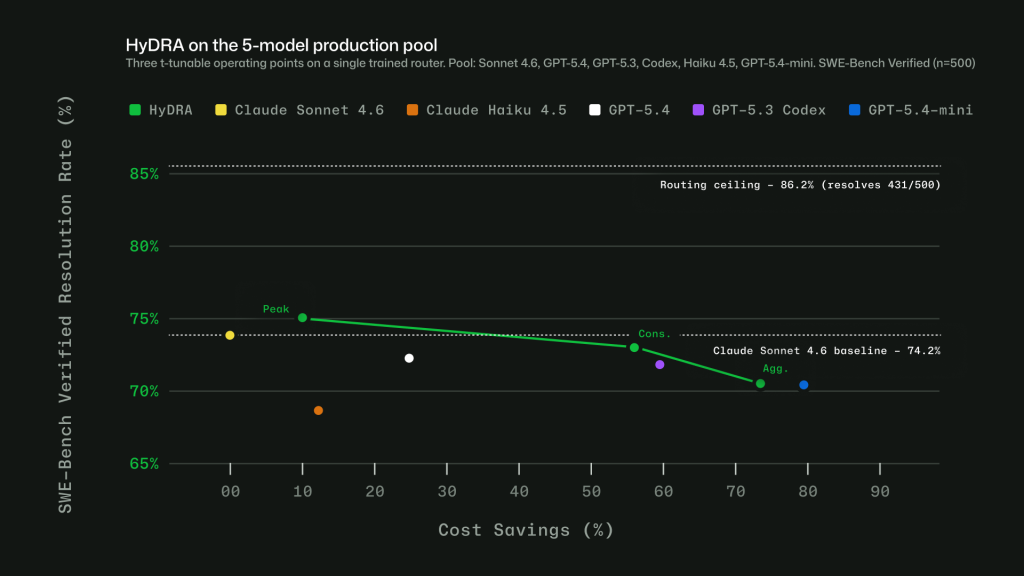
Figure 1: Three HyDRA operating points illustrate tunability: (Peak) exceeds Sonnet at 12.9% savings; (Agg.) balances quality for 72.5% savings.
![Image 2: Chart showing quality and cost tradeoffs of HyDRA and other published research and commercial routers using SWEBench benchmarks. HyDRA (Cons.) ties OpenRouter Auto on resolution rate (70.8%) at 3.3x the savings. HyDRA (Aggr.) outperforms both Azure Foundry operat
→ 原文存档
深度分析
Prompt caching turns the session prefix into the dominant cost unit
In a long agentic session, the harness re-presents instructions, repository context, conversation history, tool definitions, and task state to the model every turn. Prompt caching means a repeated prompt prefix reuses computed model state instead of being recomputed, so the marginal cost of turn N+1 is mostly the new tokens, not the whole prefix. This reframes efficiency: the biggest lever is not compressing each individual message but keeping the prefix stable so the cache keeps paying off. Anything that mutates the prefix — changed settings, reordered context, a different model — invalidates the accumulated cached state and forces a full recompute. See Context Engineering.
Deferred tool loading removes a per-turn fixed tax
A tool-rich agent session may expose MCP tools, terminal commands, file operations, workspace search, and product-specific actions. Sending every full tool schema on every turn adds a fixed cost that is independent of what the task actually needs. Tool search flips this to lazy loading: definitions enter context on demand when the model decides it needs them, so a broad toolset no longer implies broad context. The fixed-versus-variable distinction matters because fixed costs multiply across every turn of a session, while variable costs stay proportional to real usage. Related: Tool Use Patterns, MCP.
Routing must be cache-aware, not just task-aware
Switching models on every turn sounds optimally flexible, but it can lose more to cache invalidation than better routing saves. Copilot's Auto therefore routes only at natural cache boundaries: the first turn (nothing cached yet) and after compaction (the prefix resets anyway). Between those points, the selected model is deliberately held in place. This is a generalizable pattern: any per-request optimizer layered on top of a cached system must account for the invalidation cost of its own decisions, otherwise the optimizer itself becomes the largest inefficiency in the loop. See Context Window Economics.
HyDRA: quality-bar filtering first, then preference, with tunable operating points
Auto's task-aware router (HyDRA) does not rank all models directly. It first identifies which models can meet the quality bar for the task — considering reasoning depth, code complexity, debugging difficulty, and tool orchestration needs — then picks the best fit among those. This satisficing structure avoids both over-provisioning (paying for reasoning the task doesn't use) and under-provisioning (failing tasks that need it). Combined with a real-time health engine that tracks availability, utilization, speed, error rates, and cost, routing becomes time-varying: a capable model at full utilization is a worse choice than a lesser model that is ready now. The operating points are tunable: a peak-quality setting exceeds Sonnet at 12.9% savings, while an aggressive setting balances quality for 72.5% savings; on SWE-bench, the conservative setting ties OpenRouter Auto's 70.8% resolution rate at 3.3x the savings. Training across 16 language families keeps routing accuracy within four points of the English baseline, so the mechanism holds beyond English-language sessions.
实践启示
- Pick a model at session start and stick with it. Mid-session changes to model, reasoning level, context size, or tool configuration break prompt-cache reuse and force Copilot to rebuild context — often costing more than the routing change could save. Let Auto handle model changes at cache boundaries instead.
- Treat compaction as a decision point, not just a memory fix. Compaction resets the prompt prefix, which makes it the one safe moment to change models or settings. Compact long-running sessions deliberately, since compaction is also where routing re-evaluates.
- Keep toolsets and MCP servers minimal per task. Every enabled tool adds schema to context; deferred tool loading mitigates this, but disabling what you don't need still removes noise and fixed cost. Use agent finder to prune.
- Start a new session when the task changes, and name the files you already know. Less irrelevant context means more of the session goes toward the actual work; explicit file mentions beat letting the agent search for the relevant code.
- Default to Auto rather than hand-picking "the best model." Evaluations show no single model consistently wins across tasks; escalation to stronger reasoning pays off only where models actually diverge, which is exactly what the router is trained to detect.
- Watch the usage dashboard for expensive patterns. The AI usage page — and session-level usage in Copilot CLI — shows where credits go across features and models, making it possible to catch parallel-agent sprawl or oversized contexts early.
关联
- 相关概念: Harness Engineering